tos工具使用
概述
tos.py命令行工具为工程的构建、部署与调试提供了统一的一站式管理界面。
tos.py version:查看当前tos版本
❯ tos.py version
[INFO]: Running tos.py ...
[INFO]: v1.4.0-5-g0ff44488
tos.py check:检测tos工具所需的环境工具是否存在,并校验版本号
❯ tos.py check
[INFO]: Running tos.py ...
[INFO]: [git] (2.43.0 >= 2.0.0) is ok.
[INFO]: [cmake] (4.0.2 >= 3.28.0) is ok.
[INFO]: [make] (4.3 >= 3.0.0) is ok.
[INFO]: [ninja] (1.11.1 >= 1.6.0) is ok.
[INFO]: Downloading submoudules ...
[INFO]: [do subprocess]: cd /home/huatuo/work/open/TuyaOpen && git submodule update --init
[INFO]: Download submoudules successfully.
[!CAUTION]
Check 过程中出现 Error
- 工具未安装或版本过低,可安装或升级对应工具。
submodules下载失败,可尝试在TuyaOpen根目录执行git submodule update --init。
tos.py config choice:会展示当前项目所支持的所有固化配置。
❯ tos.py config choice
[INFO]: Fullclean success.
--------------------
1. ATK_T5AI_MINI_BOARD.config
2. XINGZHI_Cube_0_96OLED_WIFI.config
3. TUYA_T5AI_BOARD_EYES.config
4. TUYA_T5AI_MINI_LCD_1.3.config
5. T5AI_MOJI_1.28.config
6. TUYA_T5AI_BOARD_LCD_3.5.config
--------------------
Input "q" to exit.
Choice config file:
tos.py config menu:打开可视化配置界面。
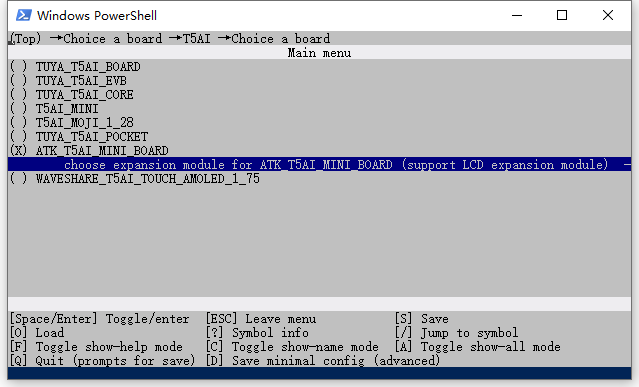
使用者可以根据项目需求修改配置选项,保存后会同步修改 app_default.config文件。
[!CAUTION]
修改配置会导致项目功能发生变化,甚至编译失败。可以询问技术支持,或者使用
choice命令重新选择配置。
tos.py config save:会将当前项目所使用的配置保存为固化配置,方便以后使用。
❯ tos.py config save
[INFO]: Running tos.py ...
Input save config name:ATK—T5AI-MINI-BOARD
tos.py build:编译项目,生成可执行文件。
❯ tos.py build
...
[INFO]: ******************************
[INFO]: /xxx/TuyaOpen/apps/tuya_cloud/switch_demo/.build/bin/switch_demo_QIO_1.0.0.bin
[INFO]: ******************************
[INFO]: ******* Build Success ********
[INFO]: ******************************
tos.py clean:清理编译缓存。
使用命令字 clean -f 深度清理。在 ninja clean 执行结束后,会删除编译目录 .build。
tos.py flash:烧录可执行文件到设备中。
❯ tos.py flash
# 输入下载端口号
tos.py monitor:显示串口日志。
❯ tos.py monitor
# 日记信息
tos.py new project:新建工程
❯ tos.py new project
running tos.py ...
input:00_base
常见问题
在 Windows 中执行 config menu 命令,方向键有失效的可能性?
这是终端模拟器兼容性问题所导致,您可以尝试以下操作:
- 在
cmd和powershell中选择可用的终端。 - 使用按键 h(⬅️)、j(⬇️)、k(⬆️)、l(➡️) 进行方向控制操作。
check 报错
- 依赖工具未安装或版本过低
- 请安装或升级对应的工具
- submodules 下载失败
- 请尝试在
TuyaOpen根目录执行git submodule update --init
- 请尝试在
could not lock config file
若出现如下报错
[WARNING]: Set repo mirro error: Cmd('git') failed due to: exit code(255)
  cmdline: git config --global --unset url.https://gitee.com/tuya-open/FlashDB.insteadOf
  stderr: 'error: could not lock config file /home/huatuo/.gitconfig: File exists'
[WARNING]: Set repo mirro error: Cmd('git') failed due to: exit code(255)
  cmdline: git config --global --unset url.https://gitee.com/tuya-open/littlefs.insteadOf
  stderr: 'error: could not lock config file /home/huatuo/.gitconfig: File exists'
可手动删除文件 ~/.gitconfig.lock