图片显示实验
前言
本章实验将介绍如何使用TuyaOpen让T5对git、png、jpeg进行解码,并显示在LCD上。
图片解码库介绍
概述
PICTURE组件是正点原子自定义的图片解码组件,可对JPEG、GIT和BMP图片进行解码。
API 描述
1,bmp_file_decode函数
BMP文件解码。
OPERATE_RET bmp_file_decode(const char *filename,int width, int height, uint8_t **output_buf,bmp_decode_write_cb decode_cb)
1.1 参数描述
| 形参 | 描述 |
|---|---|
| filename | 解码BMP文件路径 |
| width | 屏幕宽度 |
| height | 屏幕高度 |
| output_buf | 解码数据缓存 |
| decode_cb | 解码后的LCD显示回调函数 |
filename:解码文件路径
width:屏幕宽度。
height:屏幕高度。
output_buf:解码后的数据缓存。
decode_cb:解码后的LCD显示回调函数。
1.2 返回值
OPRT_OK表示解码成功,其他表示解码失败。
2,gif_file_decode函数
GIF文件解码。
OPERATE_RET gif_file_decode(const char *filename,int width, int height, uint8_t **output_buf,
                            gif_decode_write_cb decode_cb,uint16_t bkcolor)
2.1 参数描述
filename:打开文件路径
width:屏幕宽度。
height:屏幕高度。
output_buf:解码后的数据缓存。
decode_cb:解码后的LCD显示回调函数。
bkcolor:背景颜色。
2.2 返回值
OPRT_OK表示解码成功,其他表示解码失败。
3,jpeg_decode函数
JPEG文件解码。
OPERATE_RET jpeg_decode(const char *filename, int width, int height, uint8_t **output_buf, jpeg_decode_write_cb decode_cb)
3.1 参数描述
filename:打开文件路径
width:屏幕宽度。
height:屏幕高度。
output_buf:解码后的数据缓存。
decode_cb:解码后的LCD显示回调函数。
3.2 返回值:
OPRT_OK表示解码成功,其他表示解码失败。
本实验涉及了上述JPEG、BMP和GIF解码函数,其他相关函数可在TuyaOpen/examples/atk_demo/base_routine/10_picture/components/Middlewares/PICTURE路径下找到。
硬件设计
例程功能
1,测试图片解码。
[!NOTE]
TuyaOpen不能读取SD卡上的中文名称文件。
硬件资源
1,RGBLCD
LCD_R3: P23
LCD_R4: P22
LCD_R5: P21
LCD_R6: P20
LCD_R7: P19
LCD_G2: P42
LCD_G3: P41
LCD_G4: P40
LCD_G5: P26
LCD_G6: P25
LCD_G7: P24
LCD_B3: P47
LCD_B4: P46
LCD_B5: P45
LCD_B6: P44
LCD_B7: P43
LCD_PCLK: P14
LCD_DE: P16
LCD_BL: P9
LCD_RST: P27
2,SPILCD
DC/WR: P42
RST: P43
CS: P45
SCK: P44
SDA: P46
BL/PWR: P9
3,SDIO
SD_SCK- P2
SD_CMD- P3
SD_D0- P4
SD_D1- P5
SD_D2- P36
SD_D3- P37
原理图
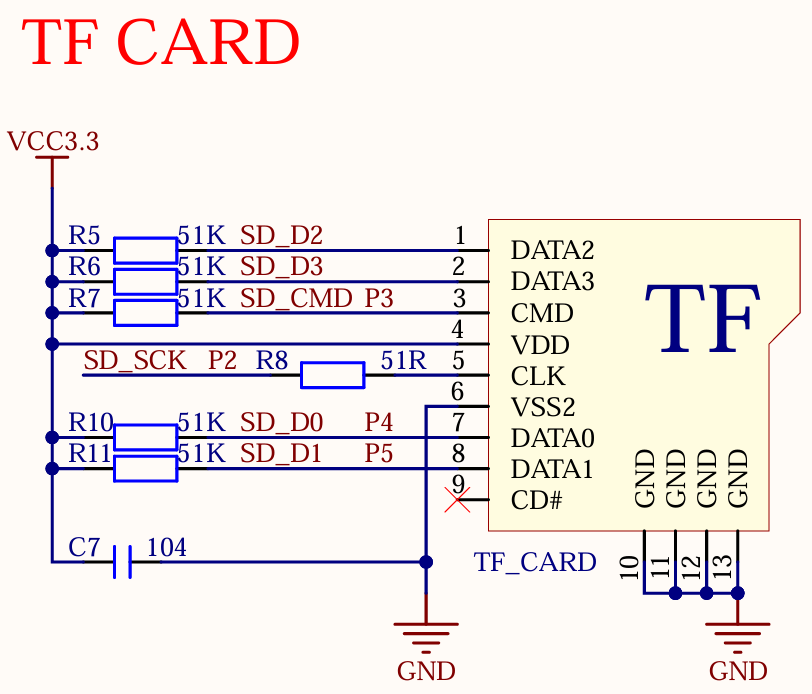
正点原子T5 AI开发板上SD卡的连接原理图,如下图所示。
程序设计
main.c驱动代码
在main.c里面编写如下代码。
#include "tal_api.h"
#include "tkl_output.h"
#include "tal_cli.h"
#include "tftlcd.h"
#include "tkl_fs.h"
#include "tkl_memory.h"
#include "tfcard.h"
#include "gif.h"
#include "bmp.h"
#include "jpeg.h"

#define PICTURE_DIR "/sdcard/PICTURE"
#define MAX_PATH_LEN 128

typedef struct PictureNode
{
    char path[MAX_PATH_LEN];
    struct PictureNode *next;
} PictureNode;

/**
 * @brief       picture decode function
 * @param[in]   w : width
 * @param[in]   h : height
 * @param[in]   pic_buf : picture buffer
 * @return      0 : success
 * @return      1 : fail
 */
uint8_t pic_gif_bmp_jpeg_decode(uint32_t w, uint32_t h, uint8_t *pic_buf)
{
    if (!tftdev.display_fb || !pic_buf) return 1;

    uint8_t *fb = (uint8_t *)tftdev.display_fb->frame;
    uint32_t lcd_w = tftdev.width;
    uint32_t lcd_h = tftdev.height;
    int x0 = (lcd_w - w) / 2;
    int y0 = (lcd_h - h) / 2;

    for (uint32_t y = 0; y < h; y++)
    {
        for (uint32_t x = 0; x < w; x++)
        {
            uint32_t dest_idx = ((y0 + y) * lcd_w + (x0 + x)) * 2;
            uint32_t src_idx = (y * w + x) * 2;
            #if defined(ATK_T5AI_MINI_BOARD_LCD_MD0700R_RGB)
            fb[dest_idx] = pic_buf[src_idx];
            fb[dest_idx + 1] = pic_buf[src_idx + 1];
            #else
            fb[dest_idx] = pic_buf[src_idx + 1];
            fb[dest_idx + 1] = pic_buf[src_idx];
            #endif
        }
    }

    tdl_disp_dev_flush(tftdev.disp_hdl, tftdev.display_fb);

    return 0;
}

/**
 * @brief       load picture list
 * @param[in]   folder_path : folder path
 * @return      PictureNode* : picture list head
 */
PictureNode* load_picture_list(const char *folder_path)
{
    TUYA_DIR dir;
    TUYA_FILEINFO info;
    const char *name;
    BOOL_T is_regular;
    PictureNode *head = NULL, *tail = NULL;
    char file_path[MAX_PATH_LEN];

    if (tkl_dir_open(folder_path, &dir) != 0)
    {
        return NULL;
    }

    /* read all files in the folder */
    while (tkl_dir_read(dir, &info) == 0)
    {
        if (tkl_dir_is_regular(info, &is_regular) == 0 && is_regular)
        {
            if (tkl_dir_name(info, &name) == 0)
            {
                const char *ext = strrchr(name, '.');
                if (ext && (
                    strcmp(ext, ".bmp") == 0 ||
                    strcmp(ext, ".jpg") == 0 ||
                    strcmp(ext, ".jpeg") == 0 ||
                    strcmp(ext, ".gif") == 0)) {
                    snprintf(file_path, MAX_PATH_LEN, "%s/%s", folder_path, name);
                    PictureNode *node = (PictureNode*)malloc(sizeof(PictureNode));
                    strncpy(node->path, file_path, MAX_PATH_LEN);
                    node->next = NULL;
                    if (tail)
                    {
                        tail->next = node;
                    }
                    else
                    {
                        head = node;
                    }
                    tail = node;
                }
            }
        }
    }
    tkl_dir_close(dir);
    return head;
}

/**
 * @brief       decode picture list
 * @param[in]   head : picture list head
 * @param[in]   width : width
 * @param[in]   height : height
 * @param[in]   buffer : picture buffer
 * @return      none
 */
void decode_picture_list(PictureNode *head, int width, int height, uint8_t *buffer)
{
    PictureNode *cur = head;
    while (cur)
    {
        const char *ext = strrchr(cur->path, '.');
        if (ext)
        {
            if (strcasecmp(ext, ".gif") == 0)
            {
                gif_file_decode(cur->path, width, height, &buffer, pic_gif_bmp_jpeg_decode, WHITE);
            }
            else if (strcasecmp(ext, ".bmp") == 0)
            {
                bmp_file_decode(cur->path, width, height, &buffer, pic_gif_bmp_jpeg_decode);
            }
            else if (strcasecmp(ext, ".jpeg") == 0 || strcasecmp(ext, ".jpg") == 0)
            {
                jpeg_decode(cur->path, width, height, &buffer, pic_gif_bmp_jpeg_decode);
            }
            tal_system_sleep(1000);
            tftlcd_clear(WHITE);
        }
        cur = cur->next;
    }
}

/**
 * @brief       free picture list
 * @param[in]   head : picture list head
 * @return      none
 */
void free_picture_list(PictureNode *head)
{
    PictureNode *cur = head;
    while (cur)
    {
        PictureNode *next = cur->next;
        tkl_system_psram_free(cur);
        cur = next;
    }
}

/**
 * @brief       user_main
 *
 * @param[in]   none
 * @return      none
 */
void user_main(void)
{
    tal_log_init(TAL_LOG_LEVEL_DEBUG, 1024, (TAL_LOG_OUTPUT_CB)tkl_log_output); /* Initialize log output */
    tdd_disp_atk_tftlcd_register();    /* Register the TFTLCD LCD display */

    tftlcd_show_string(30, 50, 200, 16, 16, "T5 MINI Board", RED);
    tftlcd_show_string(30, 70, 200, 16, 16, "PICTURE TEST", RED);
    tftlcd_show_string(30, 90, 200, 16, 16, "ATOM@ALIENTEK", RED);

    while (tfcard_init())
    {
        tftlcd_show_string(30, 110, 200, 16, 16, "SD Mount Failed!", RED);
        tal_system_sleep(500);
        tftlcd_show_string(30, 130, 200, 16, 16, "Please Check!", RED);
        tal_system_sleep(500);
    }
    tftlcd_clear(WHITE);

    uint8_t *buffer = tkl_system_psram_malloc(tftdev.width * tftdev.height * 2);
    if (!buffer) return;
    PictureNode *pic_list = load_picture_list(PICTURE_DIR);

    while (1)
    {
        /* decode picture list */
        decode_picture_list(pic_list, tftdev.width, tftdev.height, buffer);
    }

    free_picture_list(pic_list);
    tkl_system_psram_free(buffer);
}

/**
 * @brief       main
 *
 * @param       argc
 * @param       argv
 * @return      none
 */
#if OPERATING_SYSTEM == SYSTEM_LINUX
void main(int argc, char *argv[])
{
    user_main();

    while (1) {
        tal_system_sleep(500);
    }
}
#else

/**
 * @brief       The application entry point
 *
 * @param[in]   none
 * @return      none
 */
void tuya_app_main(void)
{
    user_main();
}

#endif
从user_main函数可以看到,首先从SD卡的某个路径搜索JPEG、BMP和GIF图片文件,以链表形式链接起来,然后以轮旋的方式逐一播放图片文件。
运行验证
程序下载完成后,以轮旋的方式逐一播放图片文件。